Blog

  • Describe Azure authentication methods

    Authentication is the process of establishing the identity of a person, service, or device. It requires the person, service, or device to provide some type of credential to prove who they are. Authentication is like presenting ID when you’re traveling. It doesn’t confirm that you’re ticketed, it just proves that you’re who you say you are. Azure supports multiple authentication methods, including standard passwords, single sign-on (SSO), multifactor authentication (MFA), and passwordless.

    For the longest time, security and convenience seemed to be at odds with each other. Thankfully, new authentication solutions provide both security and convenience.

    The following diagram shows the security level compared to the convenience. Notice Passwordless authentication is high security and high convenience while passwords on their own are low security but high convenience.
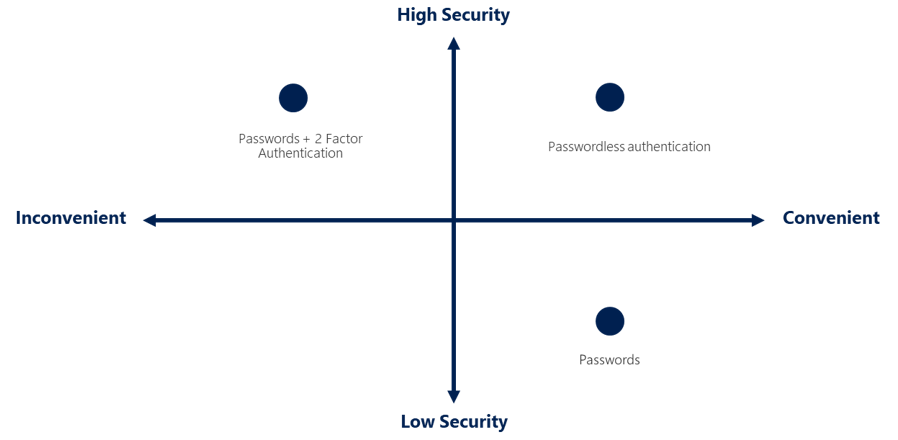
    Four quadrant diagram showing security versus convenience, with Passwords + 2 Factor authentication being high security but low convenience.

    What’s single sign-on?

    Single sign-on (SSO) enables a user to sign in one time and use that credential to access multiple resources and applications from different providers. For SSO to work, the different applications and providers must trust the initial authenticator.

    More identities mean more passwords to remember and change. Password policies can vary among applications. As complexity requirements increase, it becomes increasingly difficult for users to remember them. The more passwords a user has to manage, the greater the risk of a credential-related security incident.

    Consider the process of managing all those identities. More strain is placed on help desks as they deal with account lockouts and password reset requests. If a user leaves an organization, tracking down all those identities and ensuring they’re disabled can be challenging. If an identity is overlooked, this might allow access when it should have been eliminated.

    With SSO, you need to remember only one ID and one password. Access across applications is granted to a single identity that’s tied to the user, which simplifies the security model. As users change roles or leave an organization, access is tied to a single identity. This change greatly reduces the effort needed to change or disable accounts. Using SSO for accounts makes it easier for users to manage their identities and for IT to manage users.

     Important

    Single sign-on is only as secure as the initial authenticator because the subsequent connections are all based on the security of the initial authenticator.

    What’s multifactor authentication?

    Multifactor authentication is the process of prompting a user for an extra form (or factor) of identification during the sign-in process. MFA helps protect against a password compromise in situations where the password was compromised but the second factor wasn’t.

    Think about how you sign into websites, email, or online services. After entering your username and password, have you ever needed to enter a code that was sent to your phone? If so, you’ve used multifactor authentication to sign in.

    Multifactor authentication provides additional security for your identities by requiring two or more elements to fully authenticate. These elements fall into three categories:

    • Something the user knows – this might be a challenge question.
    • Something the user has – this might be a code that’s sent to the user’s mobile phone.
    • Something the user is – this is typically some sort of biometric property, such as a fingerprint or face scan.

    Multifactor authentication increases identity security by limiting the impact of credential exposure (for example, stolen usernames and passwords). With multifactor authentication enabled, an attacker who has a user’s password would also need to have possession of their phone or their fingerprint to fully authenticate.

    Compare multifactor authentication with single-factor authentication. Under single-factor authentication, an attacker would need only a username and password to authenticate. Multifactor authentication should be enabled wherever possible because it adds enormous benefits to security.

    What’s Microsoft Entra multifactor authentication?

    Microsoft Entra multifactor authentication is a Microsoft service that provides multifactor authentication capabilities. Microsoft Entra multifactor authentication enables users to choose an additional form of authentication during sign-in, such as a phone call or mobile app notification.

    What’s passwordless authentication?

    Features like MFA are a great way to secure your organization, but users often get frustrated with the additional security layer on top of having to remember their passwords. People are more likely to comply when it’s easy and convenient to do so. Passwordless authentication methods are more convenient because the password is removed and replaced with something you have, plus something you are, or something you know.

    Passwordless authentication needs to be set up on a device before it can work. For example, your computer is something you have. Once it’s been registered or enrolled, Azure now knows that it’s associated with you. Now that the computer is known, once you provide something you know or are (such as a PIN or fingerprint), you can be authenticated without using a password.

    Each organization has different needs when it comes to authentication. Microsoft global Azure and Azure Government offer the following three passwordless authentication options that integrate with Microsoft Entra ID:

    • Windows Hello for Business
    • Microsoft Authenticator app
    • FIDO2 security keys

    Windows Hello for Business

    Windows Hello for Business is ideal for information workers that have their own designated Windows PC. The biometric and PIN credentials are directly tied to the user’s PC, which prevents access from anyone other than the owner. With public key infrastructure (PKI) integration and built-in support for single sign-on (SSO), Windows Hello for Business provides a convenient method for seamlessly accessing corporate resources on-premises and in the cloud.

    Microsoft Authenticator App

    You can also allow your employee’s phone to become a passwordless authentication method. You may already be using the Microsoft Authenticator App as a convenient multifactor authentication option in addition to a password. You can also use the Authenticator App as a passwordless option.

    The Authenticator App turns any iOS or Android phone into a strong, passwordless credential. Users can sign-in to any platform or browser by getting a notification to their phone, matching a number displayed on the screen to the one on their phone, and then using their biometric (touch or face) or PIN to confirm. Refer to Download and install the Microsoft Authenticator app for installation details.

    FIDO2 security keys

    The FIDO (Fast IDentity Online) Alliance helps to promote open authentication standards and reduce the use of passwords as a form of authentication. FIDO2 is the latest standard that incorporates the web authentication (WebAuthn) standard.

    FIDO2 security keys are an unphishable standards-based passwordless authentication method that can come in any form factor. Fast Identity Online (FIDO) is an open standard for passwordless authentication. FIDO allows users and organizations to leverage the standard to sign-in to their resources without a username or password by using an external security key or a platform key built into a device.

    Users can register and then select a FIDO2 security key at the sign-in interface as their main means of authentication. These FIDO2 security keys are typically USB devices, but could also use Bluetooth or NFC. With a hardware device that handles the authentication, the security of an account is increased as there’s no password that could be exposed or guessed.

    https://lernix.com.my/jboss-enterprise-application-platform-training-courses-malaysia
  • Describe Azure directory services

    Microsoft Entra ID is a directory service that enables you to sign in and access both Microsoft cloud applications and cloud applications that you develop. Microsoft Entra ID can also help you maintain your on-premises Active Directory deployment.

    For on-premises environments, Active Directory running on Windows Server provides an identity and access management service that’s managed by your organization. Microsoft Entra ID is Microsoft’s cloud-based identity and access management service. With Microsoft Entra ID, you control the identity accounts, but Microsoft ensures that the service is available globally. If you’ve worked with Active Directory, Microsoft Entra ID will be familiar to you.

    When you secure identities on-premises with Active Directory, Microsoft doesn’t monitor sign-in attempts. When you connect Active Directory with Microsoft Entra ID, Microsoft can help protect you by detecting suspicious sign-in attempts at no extra cost. For example, Microsoft Entra ID can detect sign-in attempts from unexpected locations or unknown devices.

    Who uses Microsoft Entra ID?

    Microsoft Entra ID is for:

    • IT administrators. Administrators can use Microsoft Entra ID to control access to applications and resources based on their business requirements.
    • App developers. Developers can use Microsoft Entra ID to provide a standards-based approach for adding functionality to applications that they build, such as adding SSO functionality to an app or enabling an app to work with a user’s existing credentials.
    • Users. Users can manage their identities and take maintenance actions like self-service password reset.
    • Online service subscribers. Microsoft 365, Microsoft Office 365, Azure, and Microsoft Dynamics CRM Online subscribers are already using Microsoft Entra ID to authenticate into their account.

    What does Microsoft Entra ID do?

    Microsoft Entra ID provides services such as:

    • Authentication: This includes verifying identity to access applications and resources. It also includes providing functionality such as self-service password reset, multifactor authentication, a custom list of banned passwords, and smart lockout services.
    • Single sign-on: Single sign-on (SSO) enables you to remember only one username and one password to access multiple applications. A single identity is tied to a user, which simplifies the security model. As users change roles or leave an organization, access modifications are tied to that identity, which greatly reduces the effort needed to change or disable accounts.
    • Application management: You can manage your cloud and on-premises apps by using Microsoft Entra ID. Features like Application Proxy, SaaS apps, the My Apps portal, and single sign-on provide a better user experience.
    • Device management: Along with accounts for individual people, Microsoft Entra ID supports the registration of devices. Registration enables devices to be managed through tools like Microsoft Intune. It also allows for device-based Conditional Access policies to restrict access attempts to only those coming from known devices, regardless of the requesting user account.

    Can I connect my on-premises AD with Microsoft Entra ID?

    If you had an on-premises environment running Active Directory and a cloud deployment using Microsoft Entra ID, you would need to maintain two identity sets. However, you can connect Active Directory with Microsoft Entra ID, enabling a consistent identity experience between cloud and on-premises.

    One method of connecting Microsoft Entra ID with your on-premises AD is using Microsoft Entra Connect. Microsoft Entra Connect synchronizes user identities between on-premises Active Directory and Microsoft Entra ID. Microsoft Entra Connect synchronizes changes between both identity systems, so you can use features like SSO, multifactor authentication, and self-service password reset under both systems.

    What is Microsoft Entra Domain Services?

    Microsoft Entra Domain Services is a service that provides managed domain services such as domain join, group policy, lightweight directory access protocol (LDAP), and Kerberos/NTLM authentication. Just like Microsoft Entra ID lets you use directory services without having to maintain the infrastructure supporting it, with Microsoft Entra Domain Services, you get the benefit of domain services without the need to deploy, manage, and patch domain controllers (DCs) in the cloud.

    A Microsoft Entra Domain Services managed domain lets you run legacy applications in the cloud that can’t use modern authentication methods, or where you don’t want directory lookups to always go back to an on-premises AD DS environment. You can lift and shift those legacy applications from your on-premises environment into a managed domain, without needing to manage the AD DS environment in the cloud.

    Microsoft Entra Domain Services integrates with your existing Microsoft Entra tenant. This integration lets users sign into services and applications connected to the managed domain using their existing credentials. You can also use existing groups and user accounts to secure access to resources. These features provide a smoother lift-and-shift of on-premises resources to Azure.

    How does Microsoft Entra Domain Services work?

    When you create a Microsoft Entra Domain Services managed domain, you define a unique namespace. This namespace is the domain name. Two Windows Server domain controllers are then deployed into your selected Azure region. This deployment of DCs is known as a replica set.

    You don’t need to manage, configure, or update these DCs. The Azure platform handles the DCs as part of the managed domain, including backups and encryption at rest using Azure Disk Encryption.

    Is information synchronized?

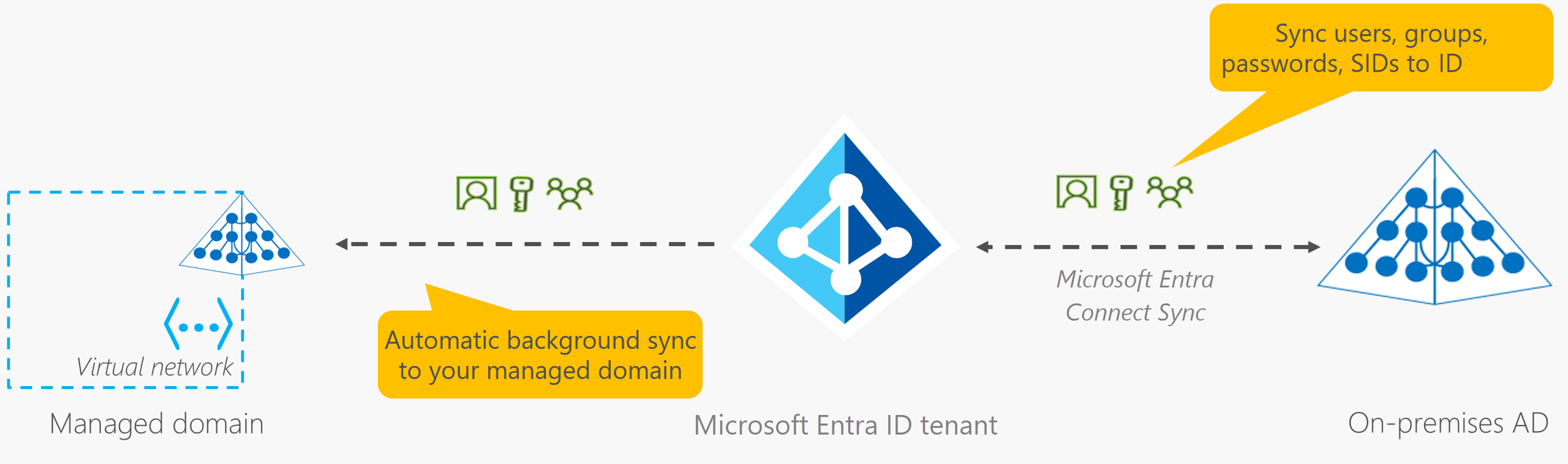
    A managed domain is configured to perform a one-way synchronization from Microsoft Entra ID to Microsoft Entra Domain Services. You can create resources directly in the managed domain, but they aren’t synchronized back to Microsoft Entra ID. In a hybrid environment with an on-premises AD DS environment, Microsoft Entra Connect synchronizes identity information with Microsoft Entra ID, which is then synchronized to the managed domain.

    Diagram of Microsoft Entra Connect Sync synchronizing information back to the Microsoft Entra tenant from on-premises AD.

    Applications, services, and VMs in Azure that connect to the managed domain can then use common Microsoft Entra Domain Services features such as domain join, group policy, LDAP, and Kerberos/NTLM authentication.

    https://lernix.com.my/iot-training-courses-malaysia

  • Describe Azure identity, access, and security

    This module covers some of the authorization and authentication methods available with Azure.

    Learning objectives

    By the end of this module, you will be able to:

    • Describe directory services in Azure, including Microsoft Entra ID and Microsoft Entra Domain Services
    • Describe authentication methods in Azure, including single sign-on (SSO), multifactor authentication (MFA), and passwordless
    • Describe external identities and guest access in Azure
    • Describe Microsoft Entra Conditional Access
    • Describe Azure Role Based Access Control (RBAC)
    • Describe the concept of Zero Trust
    • Describe the purpose of the defense in depth model
    • Describe the purpose of Microsoft Defender for Cloud

    https://lernix.com.my/checkpoint-certification-malaysia

  • Describe the benefits of manageability in the cloud

    A major benefit of cloud computing is the manageability options. There are two types of manageability for cloud computing that you’ll learn about in this series, and both are excellent benefits.

    Management of the cloud

    Management of the cloud speaks to managing your cloud resources. In the cloud, you can:

    • Automatically scale resource deployment based on need.
    • Deploy resources based on a preconfigured template, removing the need for manual configuration.
    • Monitor the health of resources and automatically replace failing resources.
    • Receive automatic alerts based on configured metrics, so you’re aware of performance in real time.

    Management in the cloud

    Management in the cloud speaks to how you’re able to manage your cloud environment and resources. You can manage these:

    • Through a web portal.
    • Using a command line interface.
    • Using APIs.
    • Using PowerShell.

    https://lernix.com.my/cisco-certification-malaysia

  • Describe the benefits of security and governance in the cloud

    Whether you’re deploying infrastructure as a service or software as a service, cloud features support governance and compliance. Things like set templates help ensure that all your deployed resources meet corporate standards and government regulatory requirements. Plus, you can update all your deployed resources to new standards as standards change. Cloud-based auditing helps flag any resource that’s out of compliance with your corporate standards and provides mitigation strategies. Depending on your operating model, software patches and updates may also automatically be applied, which helps with both governance and security.

    On the security side, you can find a cloud solution that matches your security needs. If you want maximum control of security, infrastructure as a service provides you with physical resources but lets you manage the operating systems and installed software, including patches and maintenance. If you want patches and maintenance taken care of automatically, platform as a service or software as a service deployments may be the best cloud strategies for you.

    And because the cloud is intended as an over-the-internet delivery of IT resources, cloud providers are typically well suited to handle things like distributed denial of service (DDoS) attacks, making your network more robust and secure.

    By establishing a good governance footprint early, you can keep your cloud footprint updated, secure, and well managed.

    https://lernix.com.my/citrix-certification-malaysia-2

  • Describe the benefits of reliability and predictability in the cloud

    Reliability and predictability are two crucial cloud benefits that help you develop solutions with confidence.

    Reliability

    Reliability is the ability of a system to recover from failures and continue to function. It’s also one of the pillars of the Microsoft Azure Well-Architected Framework.

    The cloud, by virtue of its decentralized design, naturally supports a reliable and resilient infrastructure. With a decentralized design, the cloud enables you to have resources deployed in regions around the world. With this global scale, even if one region has a catastrophic event other regions are still up and running. You can design your applications to automatically take advantage of this increased reliability. In some cases, your cloud environment itself will automatically shift to a different region for you, with no action needed on your part. You’ll learn more about how Azure leverages global scale to provide reliability later in this series.

    Predictability

    Predictability in the cloud lets you move forward with confidence. Predictability can be focused on performance predictability or cost predictability. Both performance and cost predictability are heavily influenced by the Microsoft Azure Well-Architected Framework. Deploy a solution built around this framework and you have a solution whose cost and performance are predictable.

    Performance

    Performance predictability focuses on predicting the resources needed to deliver a positive experience for your customers. Autoscaling, load balancing, and high availability are just some of the cloud concepts that support performance predictability. If you suddenly need more resources, autoscaling can deploy additional resources to meet the demand, and then scale back when the demand drops. Or if the traffic is heavily focused on one area, load balancing will help redirect some of the overload to less stressed areas.

    Cost

    Cost predictability is focused on predicting or forecasting the cost of the cloud spend. With the cloud, you can track your resource use in real time, monitor resources to ensure that you’re using them in the most efficient way, and apply data analytics to find patterns and trends that help better plan resource deployments. By operating in the cloud and using cloud analytics and information, you can predict future costs and adjust your resources as needed. You can even use tools like the Total Cost of Ownership (TCO) or Pricing Calculator to get an estimate of potential cloud spend.

    https://lernix.com.my/comptia-certification-malaysia

  • Describe the benefits of high availability and scalability in the cloud

    When building or deploying a cloud application, two of the biggest considerations are uptime (or availability) and the ability to handle demand (or scale).

    High availability

    When you’re deploying an application, a service, or any IT resources, it’s important the resources are available when needed. High availability focuses on ensuring maximum availability, regardless of disruptions or events that may occur.

    When you’re architecting your solution, you’ll need to account for service availability guarantees. Azure is a highly available cloud environment with uptime guarantees depending on the service. These guarantees are part of the service-level agreements (SLAs).

    This short video describes Azure SLAs in more detail.

    https://learn-video.azurefd.net/vod/player?id=638d4983-a571-47a3-a7be-382ed4a028ce&locale=en-us&embedUrl=%2Ftraining%2Fmodules%2Fdescribe-benefits-use-cloud-services%2F2-high-availability-scalability-cloud

    Scalability

    Another major benefit of cloud computing is the scalability of cloud resources. Scalability refers to the ability to adjust resources to meet demand. If you suddenly experience peak traffic and your systems are overwhelmed, the ability to scale means you can add more resources to better handle the increased demand.

    The other benefit of scalability is that you aren’t overpaying for services. Because the cloud is a consumption-based model, you only pay for what you use. If demand drops off, you can reduce your resources and thereby reduce your costs.

    Scaling generally comes in two varieties: vertical and horizontal. Vertical scaling is focused on increasing or decreasing the capabilities of resources. Horizontal scaling is adding or subtracting the number of resources.

    Vertical scaling

    With vertical scaling, if you were developing an app and you needed more processing power, you could vertically scale up to add more CPUs or RAM to the virtual machine. Conversely, if you realized you had over-specified the needs, you could vertically scale down by lowering the CPU or RAM specifications.

    Horizontal scaling

    With horizontal scaling, if you suddenly experienced a steep jump in demand, your deployed resources could be scaled out (either automatically or manually). For example, you could add additional virtual machines or containers, scaling out. In the same manner, if there was a significant drop in demand, deployed resources could be scaled in (either automatically or manually), scaling in.

    https://lernix.com.my/dell-emc-certification-malaysia

  • Describe the consumption-based model

    When comparing IT infrastructure models, there are two types of expenses to consider. Capital expenditure (CapEx) and operational expenditure (OpEx).

    CapEx is typically a one-time, up-front expenditure to purchase or secure tangible resources. A new building, repaving the parking lot, building a datacenter, or buying a company vehicle are examples of CapEx.

    In contrast, OpEx is spending money on services or products over time. Renting a convention center, leasing a company vehicle, or signing up for cloud services are all examples of OpEx.

    Cloud computing falls under OpEx because cloud computing operates on a consumption-based model. With cloud computing, you don’t pay for the physical infrastructure, the electricity, the security, or anything else associated with maintaining a datacenter. Instead, you pay for the IT resources you use. If you don’t use any IT resources this month, you don’t pay for any IT resources.

    This consumption-based model has many benefits, including:

    • No upfront costs.
    • No need to purchase and manage costly infrastructure that users might not use to its fullest potential.
    • The ability to pay for more resources when they’re needed.
    • The ability to stop paying for resources that are no longer needed.

    With a traditional datacenter, you try to estimate the future resource needs. If you overestimate, you spend more on your datacenter than you need to and potentially waste money. If you underestimate, your datacenter will quickly reach capacity and your applications and services may suffer from decreased performance. Fixing an under-provisioned datacenter can take a long time. You may need to order, receive, and install more hardware. You’ll also need to add power, cooling, and networking for the extra hardware.

    In a cloud-based model, you don’t have to worry about getting the resource needs just right. If you find that you need more virtual machines, you add more. If the demand drops and you don’t need as many virtual machines, you remove machines as needed. Either way, you’re only paying for the virtual machines that you use, not the “extra capacity” that the cloud provider has on hand.

    Compare cloud pricing models

    Cloud computing is the delivery of computing services over the internet by using a pay-as-you-go pricing model. You typically pay only for the cloud services you use, which helps you:

    • Plan and manage your operating costs.
    • Run your infrastructure more efficiently.
    • Scale as your business needs change.

    To put it another way, cloud computing is a way to rent compute power and storage from someone else’s datacenter. You can treat cloud resources like you would resources in your own datacenter. However, unlike in your own datacenter, when you’re done using cloud resources, you give them back. You’re billed only for what you use.

    Instead of maintaining CPUs and storage in your datacenter, you rent them for the time that you need them. The cloud provider takes care of maintaining the underlying infrastructure for you. The cloud enables you to quickly solve your toughest business challenges and bring cutting-edge solutions to your users.

    https://lernix.com.my/google-cloud-certification-malaysia

  • Define cloud models

    What are cloud models? The cloud models define the deployment type of cloud resources. The three main cloud models are: private, public, and hybrid.

    Private cloud

    Let’s start with a private cloud. A private cloud is, in some ways, the natural evolution from a corporate datacenter. It’s a cloud (delivering IT services over the internet) that’s used by a single entity. Private cloud provides much greater control for the company and its IT department. However, it also comes with greater cost and fewer of the benefits of a public cloud deployment. Finally, a private cloud may be hosted from your on site datacenter. It may also be hosted in a dedicated datacenter offsite, potentially even by a third party that has dedicated that datacenter to your company.

    Public cloud

    A public cloud is built, controlled, and maintained by a third-party cloud provider. With a public cloud, anyone that wants to purchase cloud services can access and use resources. The general public availability is a key difference between public and private clouds.

    Hybrid cloud

    A hybrid cloud is a computing environment that uses both public and private clouds in an inter-connected environment. A hybrid cloud environment can be used to allow a private cloud to surge for increased, temporary demand by deploying public cloud resources. Hybrid cloud can be used to provide an extra layer of security. For example, users can flexibly choose which services to keep in public cloud and which to deploy to their private cloud infrastructure.

    The following table highlights a few key comparative aspects between the cloud models.

    Public cloudPrivate cloudHybrid cloud
    No capital expenditures to scale upOrganizations have complete control over resources and securityProvides the most flexibility
    Applications can be quickly provisioned and deprovisionedData is not collocated with other organizations’ dataOrganizations determine where to run their applications
    Organizations pay only for what they useHardware must be purchased for startup and maintenanceOrganizations control security, compliance, or legal requirements
    Organizations don’t have complete control over resources and securityOrganizations are responsible for hardware maintenance and updates

    Multi-cloud

    A fourth, and increasingly likely scenario is a multi-cloud scenario. In a multi-cloud scenario, you use multiple public cloud providers. Maybe you use different features from different cloud providers. Or maybe you started your cloud journey with one provider and are in the process of migrating to a different provider. Regardless, in a multi-cloud environment you deal with two (or more) public cloud providers and manage resources and security in both environments.

    Azure Arc

    Azure Arc is a set of technologies that helps manage your cloud environment. Azure Arc can help manage your cloud environment whether it’s a public cloud solely on Azure, a private cloud in your datacenter, a hybrid configuration, or even a multi-cloud environment running on multiple cloud providers at once.

    Azure VMware Solution

    What if you’re already established with VMware in a private cloud environment but want to migrate to a public or hybrid cloud? Azure VMware Solution lets you run your VMware workloads in Azure with seamless integration and scalability.

    https://lernix.com.my/ibm-certification-malaysia

  • Describe the shared responsibility model

    You may have heard of the shared responsibility model, but you may not understand what it means or how it impacts cloud computing.

    Start with a traditional corporate datacenter. The company is responsible for maintaining the physical space, ensuring security, and maintaining or replacing the servers if anything happens. The IT department is responsible for maintaining all the infrastructure and software needed to keep the datacenter up and running. They’re also likely to be responsible for keeping all systems patched and on the correct version.

    With the shared responsibility model, these responsibilities get shared between the cloud provider and the consumer. Physical security, power, cooling, and network connectivity are the responsibility of the cloud provider. The consumer isn’t collocated with the datacenter, so it wouldn’t make sense for the consumer to have any of those responsibilities.

    At the same time, the consumer is responsible for the data and information stored in the cloud. (You wouldn’t want the cloud provider to be able to read your information.) The consumer is also responsible for access security, meaning you only give access to those who need it.

    Then, for some things, the responsibility depends on the situation. If you’re using a cloud SQL database, the cloud provider would be responsible for maintaining the actual database. However, you’re still responsible for the data that gets ingested into the database. If you deployed a virtual machine and installed an SQL database on it, you’d be responsible for database patches and updates, as well as maintaining the data and information stored in the database.

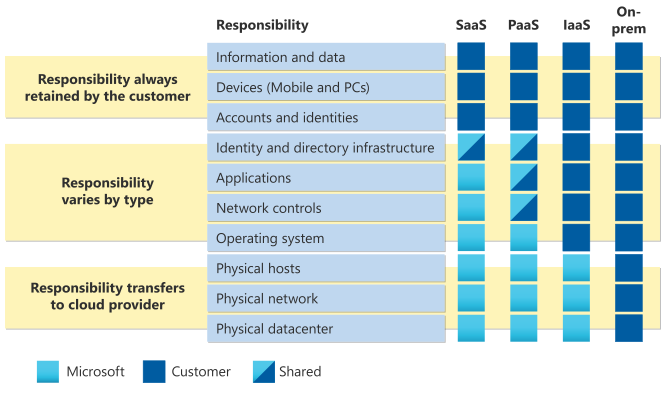
    With an on-premises datacenter, you’re responsible for everything. With cloud computing, those responsibilities shift. The shared responsibility model is heavily tied into the cloud service types (covered later in this learning path): infrastructure as a service (IaaS), platform as a service (PaaS), and software as a service (SaaS). IaaS places the most responsibility on the consumer, with the cloud provider being responsible for the basics of physical security, power, and connectivity. On the other end of the spectrum, SaaS places most of the responsibility with the cloud provider. PaaS, being a middle ground between IaaS and SaaS, rests somewhere in the middle and evenly distributes responsibility between the cloud provider and the consumer.

    The following diagram highlights how the Shared Responsibility Model informs who is responsible for what, depending on the cloud service type.

    Diagram showing the responsibilities of the shared responsibility model.

    When using a cloud provider, you’ll always be responsible for:

    • The information and data stored in the cloud
    • Devices that are allowed to connect to your cloud (cell phones, computers, and so on)
    • The accounts and identities of the people, services, and devices within your organization

    The cloud provider is always responsible for:

    • The physical datacenter
    • The physical network
    • The physical hosts

    Your service model will determine responsibility for things like:

    • Operating systems
    • Network controls
    • Applications
    • Identity and infrastructure

    https://lernix.com.my/isaca-certification-malaysia